CRUD stands for Create, Read, Update, and Delete. CRUD operations are basic data manipulation for the database. INSERT query is used to insert data in the database . SELECT Query is used to select a data from the database. UPDATE Query is used to update a data in the database and Delete Query is used to delete a data from the database. In this example we will learn how we can create crud application in CodeIgniter 4.
Download & Configure CodeIgniter 4 Application.
Download the fresh version of CodeIgniter from https://codeigniter.com/download and unzip this in your working directory and configure the base url in app/Config/App.php.
    public $baseURL = 'http://localhost:8080';
    To
    public $baseURL = 'http://localhost/crud/public';
Configure Database And Create Table.
In this step we will create database crud and table products in the crud database.
CREATE TABLE `products` (
 `product_id` int(11) NOT NULL AUTO_INCREMENT,
 `product` varchar(250) NOT NULL,
 `category` varchar(250) NOT NULL
 `price`bigint,
 `sku` varchar(150),
`model` varchar(150),
 PRIMARY KEY (`product_id`)
) ENGINE=InnoDB DEFAULT CHARSET=latin1
Now update the database credential in app/Config/Database.php.
public $default = [
		'DSN'      => '',
		'hostname' => 'localhost',
		'username' => 'root',
		'password' => '',
		'database' => 'crud',
		'DBDriver' => 'MySQLi',
		'DBPrefix' => '',
		'pConnect' => false,
		'DBDebug'  => (ENVIRONMENT !== 'production'),
		'cacheOn'  => false,
		'cacheDir' => '',
		'charset'  => 'utf8',
		'DBCollat' => 'utf8_general_ci',
		'swapPre'  => '',
		'encrypt'  => false,
		'compress' => false,
		'strictOn' => false,
		'failover' => [],
		'port'     => 3306,
	];
Create Model.
The model is used to communicate with the products table. So create model ProductModel in the app/Models/ directory and put the below code.
<?php
namespace AppModels;
use CodeIgniterModel;

class ProductModel extends Model
{
        protected $table = 'products';
        protected $primaryKey = 'product_id';
        protected $allowedFields = ['product', 'category','price','sku','model'];
}
Create Controller.
In this step we will create a controller named as ProductController. So create controller in the app/Controllers directory and put the below code .
<?php
namespace AppControllers;
use AppModelsProductModel;
use CodeIgniterController;

class ProductController extends Controller
{
    private $product = '' ;
    public function __construct(){

        $this->product = new ProductModel();
    }

    // show product list
    public function index()
	{
        $session = session();
        $data['products'] = $this->product->orderBy('product_id', 'DESC')->findAll();
		return view('products',$data);
    }

    // insert data
    public function store() {

        $data = [
            'product' => $this->request->getVar('product'),
            'category'  => $this->request->getVar('category'),
            'price'  => $this->request->getVar('price'),
            'sku'  => $this->request->getVar('sku'),
            'model'  => $this->request->getVar('model'),
        ];

        $this->product->insert($data);
        $session = session();
        $session->setFlashdata('msg', 'Product Successfully Added');
        return $this->response->redirect(site_url('/list'));
    }

    // show product by id
    public function edit($product_id){

        $data['product'] = $this->product->where('product_id', $product_id)->first();
        echo json_encode($data['product']);
    }

    // update product data
    public function update(){

         $id = $this->request->getVar('id');
        $data = [
            'product' => $this->request->getVar('product'),
            'category'  => $this->request->getVar('category'),
            'price'  => $this->request->getVar('price'),
            'sku'  => $this->request->getVar('sku'),
            'model'  => $this->request->getVar('model'),
        ];
        $this->product->update($id, $data);
        return $this->response->redirect(site_url('/list'));
    }

     // delete product
     public function delete(){

        $id = $this->request->getVar('delete_id');
        $data['product'] = $this->product->where('product_id', $id)->delete($id);
        return $this->response->redirect(site_url('/list'));
    }

}
Add below code in route inside the app/Config/Routes.php.
$routes->get('/', 'ProductController::index');
$routes->get('/list', 'ProductController::index');
$routes->post('add-product', 'ProductController::store');
$routes->get('edit-product/(:num)', 'ProductController::edit/$1');
$routes->post('update-product', 'ProductController::update');
$routes->post('delete-product', 'ProductController::delete');
Create View.
In this step post we will create a view inside the and appViews directory named as products.php. So create a view file in the same directory and put the below code.
<html> <head> <link rel="stylesheet" href="https://fonts.googleapis.com/css?family=Roboto|Varela+Round"> <link rel="stylesheet" href="https://stackpath.bootstrapcdn.com/bootstrap/4.5.0/css/bootstrap.min.css"> <link rel="stylesheet" href="https://fonts.googleapis.com/icon?family=Material+Icons"> <link rel="stylesheet" href="https://maxcdn.bootstrapcdn.com/font-awesome/4.7.0/css/font-awesome.min.css"> <script src="https://code.jquery.com/jquery-3.5.1.min.js"></script> <script src="https://cdn.jsdelivr.net/npm/[email protected]/dist/umd/popper.min.js"></script> <script src="https://stackpath.bootstrapcdn.com/bootstrap/4.5.0/js/bootstrap.min.js"></script> </head> <body> <div class="container"> <div class="table-responsive"> <div class="table-wrapper"> <div class="table-title"> <div class="row"> <div class="col-sm-6"> <h2>Manage<b> Products</b></h2> </div> <div class="col-sm-6"> <a href="#addProductModal" class="btn btn-success" data-toggle="modal"><i class="material-icons"></i> <span>Add Product</span></a> </div> </div> </div> <table class="table table-striped table-hover"> <thead> <tr> <th>Product</th> <th>Categroy</th> <th>Price</th> <th>SKU</th> <th>Model</th> <th>Actions</th> </tr> </thead> <tbody> <?php foreach($products as $product) { ?> <tr> <td><?=$product['product']?></td> <td><?=$product['category']?></td> <td><?=$product['price']?></td> <td><?=$product['sku']?></td> <td><?=$product['model']?></td> <td> <a href="#editProductModal" data-id="<?=$product['product_id']?>"class="edit" data-toggle="modal"><i class="material-icons" data-toggle="tooltip" title="Edit"></i></a> <a href="#deleteProductModal" data-delete_id="<?=$product['product_id']?>" class="delete" data-toggle="modal"><i class="material-icons" data-toggle="tooltip" title="Delete"></i></a> </td> </tr> <?php } ?> </tbody> </table> </div> </div> </div> <!-- Add Modal HTML --> <div id="addProductModal" class="modal fade"> <div class="modal-dialog"> <div class="modal-content"> <form method ="post" action="<?= site_url('/add-product') ?>"> <div class="modal-header"> <h4 class="modal-title">Add Product</h4> <button type="button" class="close" data-dismiss="modal" aria-hidden="true">×</button> </div> <div class="modal-body"> <div class="form-group"> <label>Product</label> <input type="text" name ="product" id = "product" class="form-control" required> </div> <div class="form-group"> <label>Categroy</label> <input type="text" name ="category" id = "category" class="form-control" required> </div> <div class="form-group"> <label>Price</label> <input type="number" name ="price" id ="price" class="form-control" required> </div> <div class="form-group"> <label>SKU</label> <input type="text" name ="sku" id = "sku" class="form-control" required> </div> <div class="form-group"> <label>Model</label> <input type="text" name ="model" name = "model" class="form-control" required> </div> </div> <div class="modal-footer"> <input type="button" class="btn btn-default" data-dismiss="modal" value="Cancel"> <input type="submit" class="btn btn-info" value="Save"> </div> </form> </div> </div> </div> <!-- Edit Modal HTML --> <div id="editProductModal" class="modal fade"> <div class="modal-dialog"> <div class="modal-content"> <form method ="post" action="<?= site_url('/update-product') ?>"> <div class="modal-header"> <h4 class="modal-title">Update Product</h4> <button type="button" class="close" data-dismiss="modal" aria-hidden="true">×</button> </div> <div class="modal-body"> <div class="form-group"> <label>Product</label> <input type="text" name ="product" id = "edit_product" class="form-control" required> </div> <div class="form-group"> <label>Categroy</label> <input type="text" name ="category" id = "edit_category" class="form-control" required> </div> <div class="form-group"> <label>Price</label> <input type="number" name ="price" id ="edit_price" class="form-control" required> </div> <div class="form-group"> <label>SKU</label> <input type="text" name ="sku" id = "edit_sku" class="form-control" required> </div> <div class="form-group"> <label>Model</label> <input type="text" name ="model" id = "edit_model" class="form-control" required> <input type="hidden" name ="id" id = "edit_id" required> </div> </div> <div class="modal-footer"> <input type="button" class="btn btn-default" data-dismiss="modal" value="Cancel"> <input type="submit" class="btn btn-info" value="Update"> </div> </form> </div> </div> </div> <!-- Delete Modal HTML --> <div id="deleteProductModal" class="modal fade"> <div class="modal-dialog"> <div class="modal-content"> <form method ="post" action="<?= site_url('/delete-product') ?>"> <div class="modal-header"> <h4 class="modal-title">Delete Product</h4> <button type="button" class="close" data-dismiss="modal" aria-hidden="true">×</button> </div> <div class="modal-body"> <p>Are you sure you want to delete these Records?</p> <p class="text-warning"><small>This action cannot be undone.</small></p> <input type="hidden" id="delete_id" name="delete_id"> </div> <div class="modal-footer"> <input type="button" class="btn btn-default" data-dismiss="modal" value="Cancel"> <input type="submit" class="btn btn-danger" value="Delete"> </div> </form> </div> </div> </div> </body> </html>
Add some css in the above view file.
body {
	color: #566787;
	background: #f5f5f5;
	font-family: 'Varela Round', sans-serif;
	font-size: 13px;
	max-width:1540px
}
.table-responsive {
    margin: 30px 0;
}
.table-wrapper {
	background: #fff;
	padding: 20px 25px;
	border-radius: 3px;
	min-width: 1000px;
	box-shadow: 0 1px 1px rgba(0,0,0,.05);
}
.table-title {
	padding-bottom: 15px;
	background: #0397d6;
	color: #fff;
	padding: 16px 30px;
	min-width: 100%;
	margin: -20px -25px 10px;
	border-radius: 3px 3px 0 0;
}
.table-title h2 {
	margin: 5px 0 0;
	font-size: 24px;
}
.table-title .btn-group {
	float: right;
}
.table-title .btn {
	color: #fff;
	float: right;
	font-size: 13px;
	border: none;
	min-width: 50px;
	border-radius: 2px;
	border: none;
	outline: none !important;
	margin-left: 10px;
}
.table-title .btn i {
	float: left;
	font-size: 21px;
	margin-right: 5px;
}
.table-title .btn span {
	float: left;
	margin-top: 2px;
}
table.table tr th, table.table tr td {
	border-color: #e9e9e9;
	padding: 12px 15px;
	vertical-align: middle;
}
table.table tr th:first-child {
	width: 60px;
}
table.table tr th:last-child {
	width: 100px;
}
table.table-striped tbody tr:nth-of-type(odd) {
	background-color: #fcfcfc;
}
table.table-striped.table-hover tbody tr:hover {
	background: #f5f5f5;
}
table.table th i {
	font-size: 13px;
	margin: 0 5px;
	cursor: pointer;
}
table.table td:last-child i {
	opacity: 0.9;
	font-size: 22px;
	margin: 0 5px;
}
table.table td a {
	font-weight: bold;
	color: #566787;
	display: inline-block;
	text-decoration: none;
	outline: none !important;
}
table.table td a:hover {
	color: #2196F3;
}
table.table td a.edit {
	color: #FFC107;
}
table.table td a.delete {
	color: #F44336;
}
table.table td i {
	font-size: 19px;
}
table.table .avatar {
	border-radius: 50%;
	vertical-align: middle;
	margin-right: 10px;
}

/* Modal styles */
.modal .modal-dialog {
	max-width: 400px;
}
.modal .modal-header, .modal .modal-body, .modal .modal-footer {
	padding: 20px 30px;
}
.modal .modal-content {
	border-radius: 3px;
	font-size: 14px;
}
.modal .modal-footer {
	background: #ecf0f1;
	border-radius: 0 0 3px 3px;
}
.modal .modal-title {
	display: inline-block;
}
.modal .form-control {
	border-radius: 2px;
	box-shadow: none;
	border-color: #dddddd;
}
.modal textarea.form-control {
	resize: vertical;
}
.modal .btn {
	border-radius: 2px;
	min-width: 100px;
}
.modal form label {
	font-weight: normal;
}
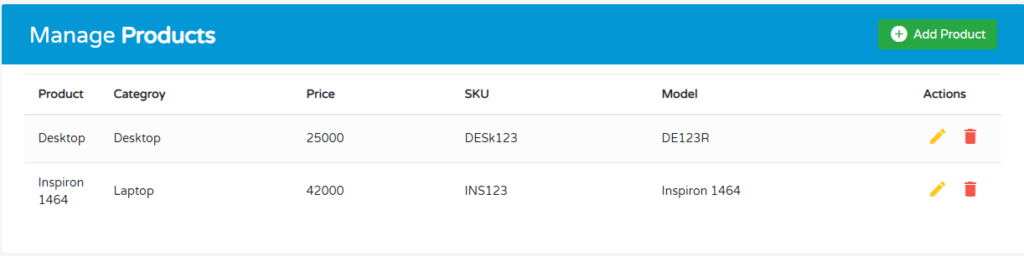
This is how our CodeIgniter crud application looks like.
The post CodeIgniter 4 CRUD with MySQL appeared first on PHPFOREVER.